Skip to content
newaso.
Local-first ASO · Play + App Store

Know exactly what to rank for.

Turn an app idea — or a live listing — into competitor-backed keywords, scores you can defend, and copy-paste-ready copy for Google Play and the App Store.

  • No account required
  • Google Play + App Store
  • Your data stays local

Screenshot Studio is next — the rest of the workspace is live today.

Example projectBloodSnaplive on Google Play & the App Store

newaso / bloodsnapLocal
BloodSnap app icon

BloodSnap

Health & Fitness · United States

OverviewIdea validationCompetitorsKeywordsScoringListingRank

Opportunity

59medium conf.

Keywords

26820 focus

Best rank

#117 markets
KeywordVolOpp
blood pressure app8559
bp health log8559
blood pressure monitor8558
health8355
Saved locally · BloodSnapExport CSV
10tools live today
2stores, one project
17live-rank markets
0accounts required
Product tour · real captures

This is the actual workspace.

Not a design concept. Every frame below is a live capture from the BloodSnap project — the same screens used to score keywords, write listings, and check rank on Google Play and the App Store.

8 real captures
newaso / bloodsnapLive capture
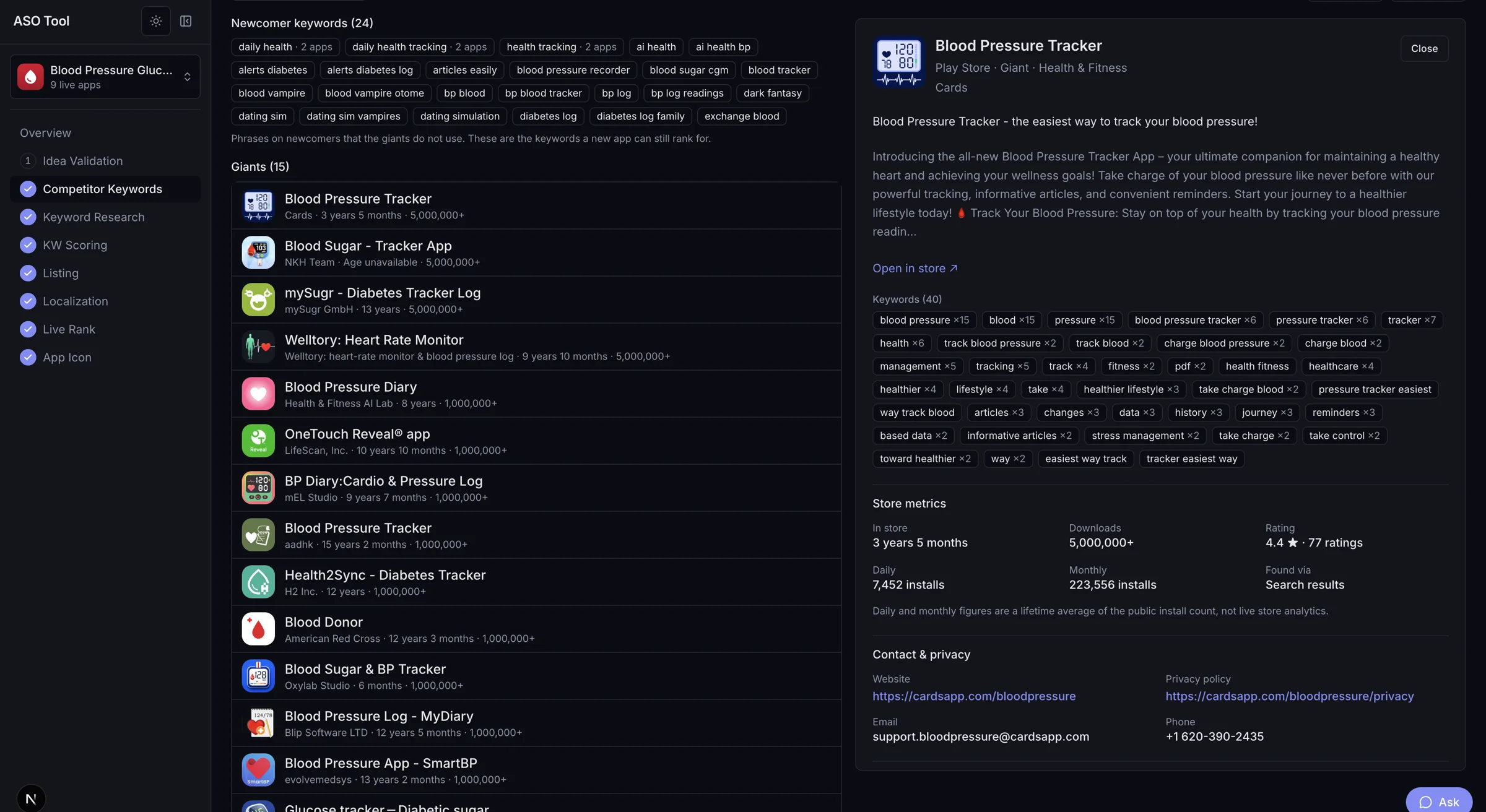
NewASO Competitor Keywords screen showing 24 newcomer keywords and 15 phrases owned by giants, with a competitor detail drawer.

The phrases giants leave open.

NewASO separates newcomer keywords from the phrases giants already own, then shows the competitor listing, repeated keyword counts, and store metrics behind each one.

24 newcomer15 giants35 competitors readFull size

Click any capture to open the full-size image. Numbers are from the actual BloodSnap project; no placeholder rows were added for the tour.

The workspace

Every ASO job. One project.

Stop moving spreadsheets between five tabs. Each app gets a dashboard, a research trail, scored keywords, and a listing studio — in the same place.

App Dashboard

Every app, every signal, one board.

Your projects live in one place with a live snapshot of each app: store rating, keyword coverage, tracked rank, and what to do next. One project equals one app, so overlapping ideas never blur together.

blood pressure app59
bp health log59
blood pressure monitor58
Idea Validation

Go, Refine, or Drop — backed by real research.

Describe your idea in a few sentences. NewASO refines the concept, runs competitor keywords, keyword research, and scoring for real, then writes a verdict around those numbers. Every report ends with concrete ways to sharpen the idea and related niches ranked by demand against competition.

GoRefineDropreal run · 46 with demand

Live AI Assistant

A guide that reads the screen with you.

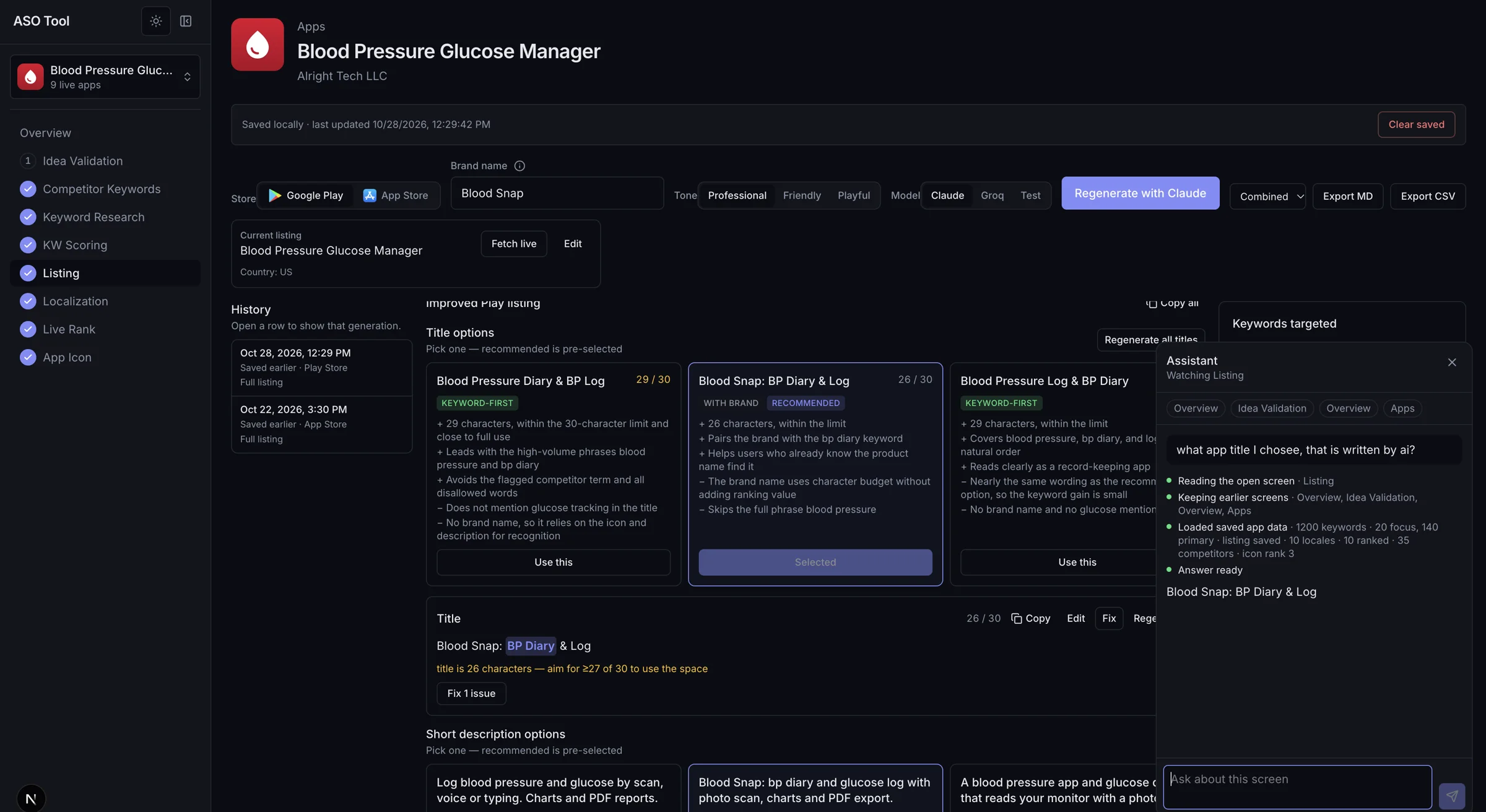
Ask about the screen in front of you. The assistant reads the open screen, keeps earlier screens in context, and loads the saved project data before it answers — so it can explain a keyword score, compare title options, or tell you what to fix next. It runs on Claude or Groq with your own key.

“What title did I choose — was it written by AI?”

Reading Listing1,200 keywords loaded

Competitor Keywords

See the phrases competitors already own.

Pull similar apps, niche search results, and up to five URLs you already know. NewASO mines titles, subtitles, and repeated description phrases, then turns the phrases that show up across multiple apps into your keyword roots.

24 newcomer15 giants35 competitors read

Keyword Research

Expand roots with real store autocomplete.

Seeds start from competitor roots, then LLM synonyms and nearby intents, then your own live listing. Google Play and App Store autocomplete expand each seed, and a quality pass keeps high-intent 2–3 word phrases instead of junk one-word noise.

80 seeds1,200 keywordsPlay + iOS

KW Scoring

Five scores. One clear recommendation.

Volume index, competition, difficulty, relevance, and opportunity — each scored 0–100 with a confidence label. Recommendations sort keywords into Focus, Primary, Secondary, Maybe, and Skip, so you know what belongs in the title and what should stay out.

opportunity = relevance × volume ×
(100 − difficulty) / 100²

Listing Studio

Both stores, inside their character limits.

Generate validated copy for Google Play and the App Store from your scored keywords. Titles, subtitles, keyword field, short and full descriptions, and tags each get a live character counter, banned-word checks, and keyword usage counts. Copy the field, not the homework.

30 / 30100 / 1004000 / 4000

Localization

Ten markets, without ten rewrites.

Adapt a Play listing into ten language-diverse markets, including right-to-left Arabic and Urdu. Preview each locale in the store layout, keep field limits intact, and export the whole set as JSON for Play Console.

en-USde-DEfr-FRnl-NLja-JPko-KRar-AEur-PK

Live Rank

Check where you actually rank, right now.

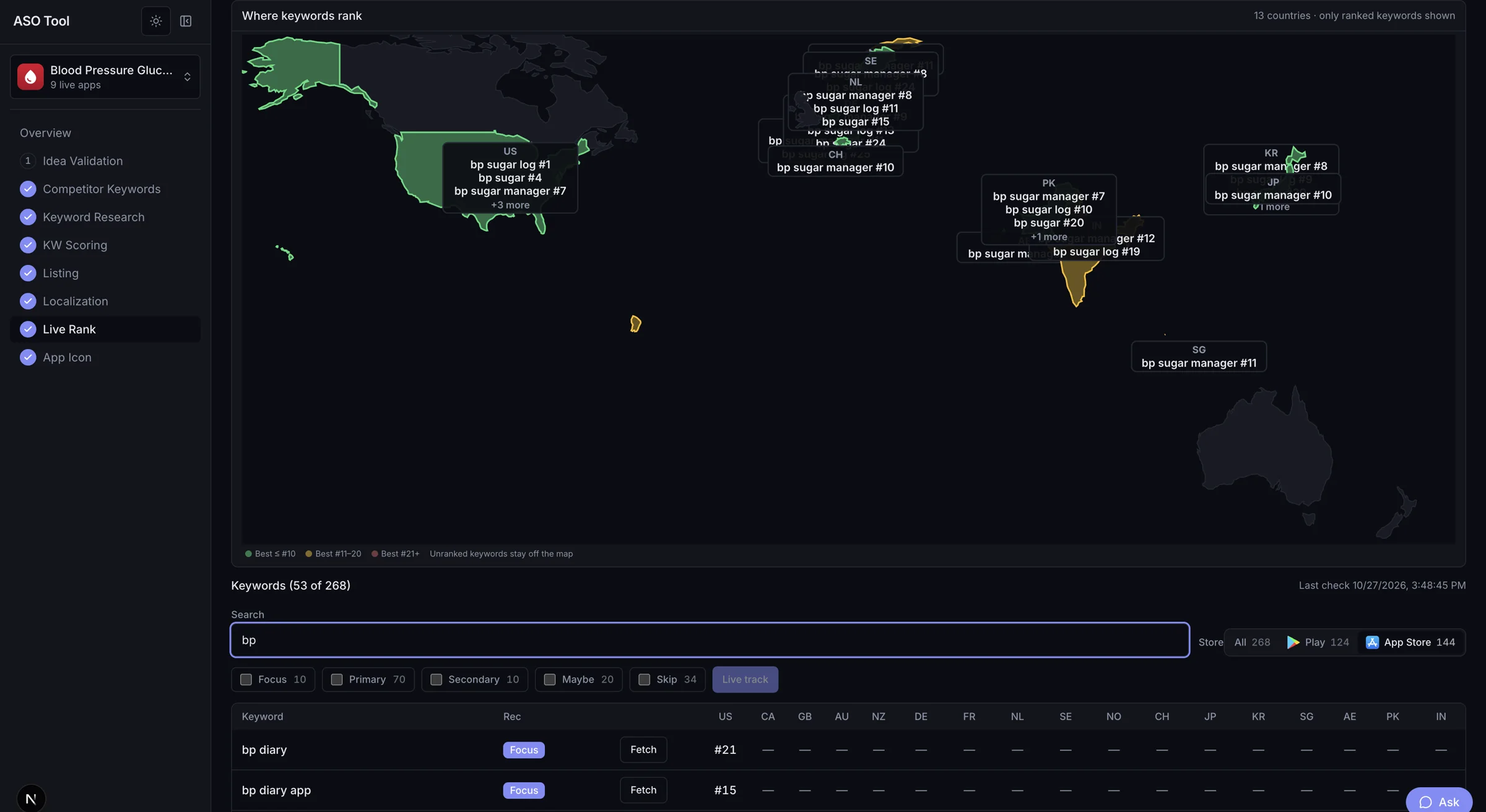
Run on-demand position checks for tracked keywords across 17 markets and both stores. The world map plots the 13 countries where keywords currently hold a position, and a country matrix shows the exact rank for every keyword. Results are saved per check so you can compare this week's rank with the last one.

US#1DE#1JP#1bp manager · 17 markets

App Icon Studio

Rank icons and ratings against the category.

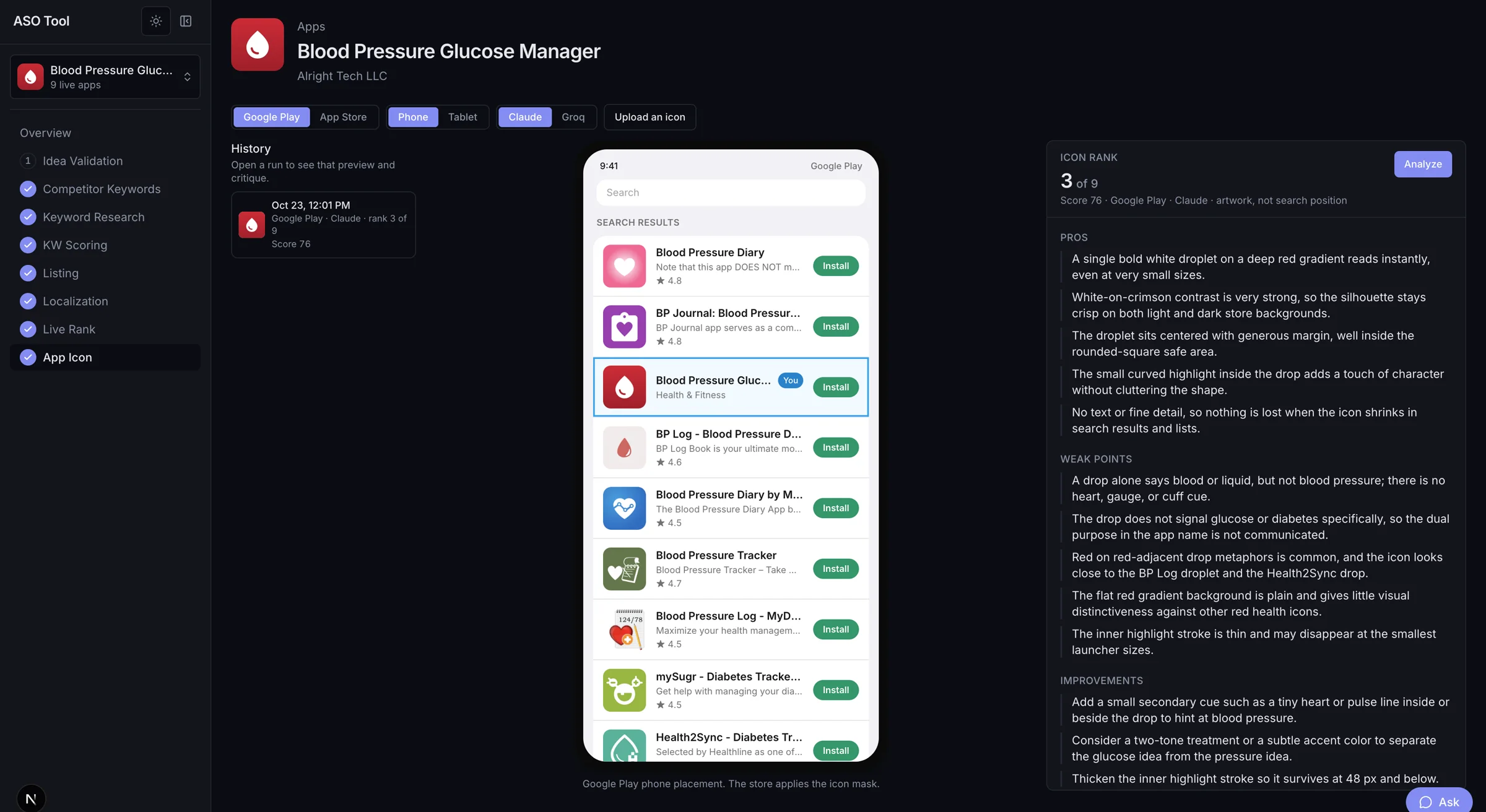
Compare your current icon with eight competitor icons in Google Play and App Store phone and tablet mockups. Claude vision ranks the artwork, writes specific improvement notes, and hands you copy-paste prompts for Gemini and OpenAI — while competitor search results show their store ratings.

BloodSnap app icon3Blood Pressure Diary app iconBP Journal app iconBP Log app iconranked 3 of 9
score 76
Coming soon

Screenshot Studio

Store-ready screenshot sets, without the design grind.

Screenshot Studio takes your raw captures and turns them into a complete, localized set sized for Google Play and the App Store — consistent framing, sharp captions, and export-ready files. It is the next release in the workspace.

Play + iOS
sizes

Screenshot Studio is in development. Everything else is available in the app today.

Inside the workspace

Real screens. Real decisions.

Three parts of NewASO that are easy to describe and hard to fake: an assistant that reads the screen, a map of where keywords actually rank, and an icon review that compares the artwork you have with the category you are in.

Live AI assistant

An assistant that reads the screen with you.

Ask a question in plain language. The assistant reads the open screen, keeps earlier screens in context, and loads the saved project data before it answers — so the guidance is about the listing in front of you, not generic ASO advice.

  • Reads the open screen and keeps earlier screens in context
  • Answers with the project's real data: 1,200 keywords, 35 competitors, 10 locales
  • Helps you choose between title options, keywords, and the next step
Screen-awareProject contextDecision support
newaso / bloodsnapAssistant open
NewASO Live AI assistant open beside the BloodSnap listing, reading the Listing screen and answering a question about the generated title.

Real prompt from the capture

“what app title I chose, that is written by ai?”

Reading the open screenListing1,200 keywords loaded
Live rank world map

Where your keywords rank, country by country.

Rank checks run across 17 markets. The map plots the 13 countries where tracked keywords currently hold a position, and the matrix below it shows the exact rank for every keyword and country. Unranked keywords stay off the map instead of pretending to be zero.

  • A world map of ranked keywords, grouped by country
  • Only keywords with a live position appear — no invented zeros
  • Country-by-country matrix with the exact rank per keyword
13 countries mapped53 of 268 ranked17 markets checked
newaso / bloodsnap13 countries
NewASO Live Rank world map showing where BloodSnap keywords rank across 13 countries, with a keyword-by-country matrix underneath.

US

bp sugar log

#1

CH

bp sugar manager

#7

JP

bp sugar manager

#10

Icon & review comparison

Rank the icon. Compare the category.

Upload the current icon and NewASO places it beside eight competitor icons from the same category. Vision ranks the artwork, writes what works and what does not, and returns prompts for image models. Competitor search results carry their store ratings, so the review gap sits next to the artwork gap.

  • BloodSnap's real icon ranked 3 of 9 with a score of 76
  • Written pros, weak points, and concrete improvements
  • Competitor icons with their live store ratings side by side
  • Artwork rank only — never presented as a search position
Rank 3 of 9Score 768 competitors compared
newaso / bloodsnapIcon rank 3 of 9
NewASO App Icon analysis for BloodSnap showing icon rank 3 of 9, score 76, competitor search results, and written pros, weak points, and improvements.

Compared with eight category icons

Score 76
Blood Pressure Diary app icon4.8
BP Journal app icon4.8
BloodSnap app icon3You
BP Log app icon4.6
Blood Pressure Diary by MedM app icon4.5
Blood Pressure Tracker app icon4.7
Blood Pressure Log MyDiary app icon4.5
mySugr app icon4.5
Health2Sync app icon4.5

Store ratings shown under competitor icons. Artwork rank is not a search-position claim.

From the real analysis

“A drop alone says blood or liquid, but not blood pressure.”

Weak point, followed by a concrete fix in the report.

Captures are from a real BloodSnap project in NewASO. Keyword scores are heuristic estimates with confidence labels; rank positions were checked on the dates shown in the workspace.

Idea validation

A verdict, not a vibe.

Most idea checks ask a model whether your concept sounds good. NewASO runs the research first — competitor keywords, autocomplete expansion, and five-signal scoring — then writes the Go, Refine, or Drop verdict around what actually came back.

  • Go means real demand with openings competitors have not already taken.
  • Refine means demand exists, but the category is crowded or your wedge needs sharpening.
  • Drop means thin demand, or a crowded category where the idea adds no specific feature.
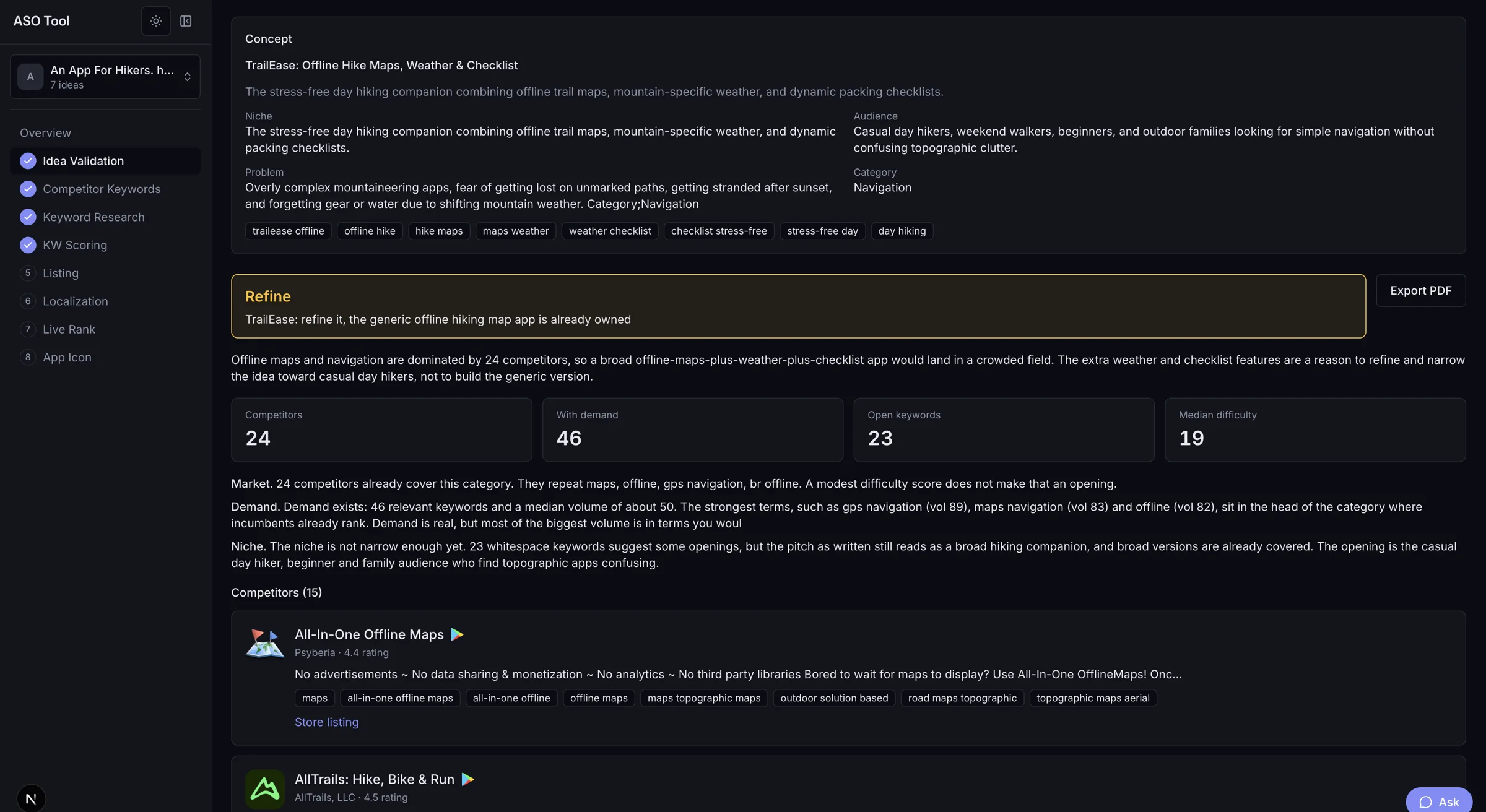
See how the report is built
newaso / traileaseRefine · real run
Real NewASO idea validation report for TrailEase, a hiking app, showing a Refine verdict, 24 competitors, 46 relevant keywords, and 23 open keywords.

Competitors

24

With demand

46

Open keywords

23

Median difficulty

19

Real capture from TrailEase, a separate project in the same workspace. The Refine verdict and the numbers above come from the research run, not from a prompt.

Keyword scoring

Google PlayApp Store

blood pressure app

2 words · autocomplete + LLM

Focus
Volume85
Competition59
Difficulty24
Relevance90
Opportunity59

Confidence

Medium · 2 sources

opportunity = relevance × volume × (100 − difficulty) / 100²
FocusPrimarySecondaryMaybeSkip

Heuristic estimates — every score carries a Low, Medium, or High confidence label.

Real BloodSnap value from a 268-keyword scoring run.

Keyword scoring

Scores you can defend.

Five signals, each on a 0–100 scale, plus a confidence label that tells you when the data is thin. Recommendations fall out of the numbers instead of a hunch.

  • Volume is estimated from autocomplete position, source overlap, and phrase length — not a black-box paid index.
  • Difficulty weighs rating counts, installs, publisher size, and title-match density.
  • Opportunity combines relevance, volume, and difficulty into one number you can sort.
Read the scoring model
Listing studio

Every field fits. Every keyword counts.

Generate both store listings from your scored keywords. Each field is validated against the real limits before you copy it — titles, subtitles, keyword field, descriptions, and tags.

  • Play ranks on title, short, and full description. iOS ranks on name, subtitle, and keyword field — the copy knows the difference.
  • Banned words, emoji in titles, ALL CAPS, and keyword stuffing are checked in code, never trusted to the model.
  • Live character counters, keyword usage counts, and estimated visibility as you edit.
See the listing rules

Listing studio

Google PlayApp Store
Title26 / 30

Blood Snap: BP Diary & Log

Short description76 / 80

Blood Snap: bp diary and glucose log with photo scan, charts and PDF export.

Full description3,961 / 4,000

Blood Snap is a blood pressure app and glucose manager in one place…

Tags5 / 5

blood pressure app, bp diary, glucose tracker, blood sugar log, health log

Keywords used

bp diary×7blood sugar×4blood pressure app×2
Limits + stuffing checked in codeCopy all fields
Local-first

Your research stays yours.

NewASO runs on your machine. Projects, keywords, listings, and rank history live in a local SQLite database — not in an account you have to trust us with.

  • Local-first, by design

    Your projects and research sit in a database on your machine. There is no NewASO account to create and no research library on our servers.

  • Evidence over vibes

    Every recommendation traces back to competitor phrases, live autocomplete, and search results — with confidence labels where the data is thin.

  • Ship, don't study

    The workspace exists to get you from an idea to a validated listing you can paste into Play Console and App Store Connect.

Local workspacePrivate
$ DATABASE_URL="file:./dev.db"
Projects12
Keywords1,284
Listings18
Rank checks96
On this device0 bytes on our servers
How it works

From idea to listing in five steps.

No setup marathon. Start with what you already have — an idea, a URL, or a competitor you keep bumping into.

01

Add your app

Paste a Google Play or App Store URL, or describe the idea in 2–5 sentences. Add up to five competitors if you already know them.

02

Mine the competition

NewASO reads competitor titles, subtitles, and descriptions to find the phrases more than one app leans on.

03

Expand with live search

Competitor roots meet LLM synonyms and real store autocomplete, then get filtered down to phrases people actually type.

04

Score before you write

Five signals and a confidence label turn a long list into Focus, Primary, Secondary, Maybe, and Skip.

05

Ship and track

Generate both listings, check live rank, review your icon with vision-backed notes, and ask the assistant to explain what to fix next.

FAQ

Questions, answered honestly.

Including the ones about accuracy, API keys, and what is actually shipped.

Still unsure?

Ask anything before you install. A real reply, not a bot.

hello@mrhaseeb.com
Read the full FAQ
What exactly is NewASO?

NewASO is a local-first ASO workspace for independent developers and small studios. One project per app: validate the idea, mine competitor keywords, research and score keywords, write both store listings, check live rank, and review your icon — without stitching five tools together.

Do I need API keys to use it?

The LLM-powered steps — idea validation, keyword expansion, listing copy, and icon review — use your own Anthropic (Claude) API key, read from your local environment. Store metadata, search results, and rank checks come from public Google Play and App Store endpoints and need no paid API.

Where does my research data live?

In a SQLite database on your own machine. Projects, keywords, listings, and rank history are never uploaded to NewASO servers. Requests to Google Play, the App Store, and your chosen LLM provider carry only the text needed for that step. The marketing site has no accounts and no tracking cookies.

What does the AI assistant actually do?

It answers questions about the screen you are on. Before replying it reads the open screen, keeps earlier screens in context, and loads the saved project data — keywords, listing, locales, competitors, and rank checks. It can explain a score, compare title options, or suggest what to fix next. It uses your own Anthropic or Groq key, and it never invents a keyword score.

Which stores and countries are supported?

Google Play and the Apple App Store. Live Rank covers 17 markets and Localization covers 10 language-diverse locales, including right-to-left Arabic and Urdu. Research runs one country at a time by design, so scores stay comparable.

How accurate are the keyword scores?

They are heuristic, not paid volume data. Volume is estimated from autocomplete position, source overlap, and phrase length; competition and difficulty come from live search results. Every score carries a Low–High confidence label so you know how much weight it can bear. No tool can guarantee a ranking.

Early access

Your next app deserves a better launch.

Validate the idea, find the keywords, and write both listings before you spend another weekend guessing. Tell us what you are building.

No account, no newsletter. Just a reply about your app.